
참고 자료
Ray Marching이란
Ray marching is a class of rendering methods for 3D computer graphics where rays are traversed iteratively, effectively dividing each ray into smaller ray segments, sampling some function at each step. For example, in volume ray casting the function would access data points from a 3D scan. In Sphere tracing, the function estimates a distance to step next. Ray marching is also used in physics simulations as an alternative to ray tracing where analytic solutions of the trajectories of light or sound waves are solved. Ray marching for computer graphics often takes advantage of SDFs to determine a maximum safe step-size, while this is less common in physics simulations a similar adaptive step method can be achieved using adaptive Runge-Kutta methods.
Ray Marching은 렌더링 방법의 한 종류로 물체의 SDF(거리 함수)를 통해 오브젝트를 판별하고 렌더링하는 방식이다.
SDF (Signed Distance Function)
- 어떤 점 p가 있을 때, 그 점에서 형상의 표면까지의 최단 거리를 반환하는 함수.
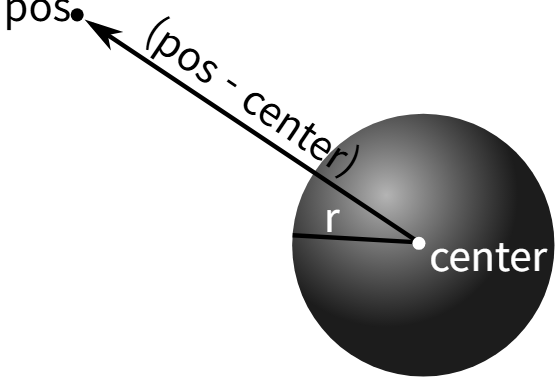
cpp
// 가장 기초적인 구 형태의 SDF
float SDFSphere(vec3 pos, vec3 center, float r)
{
    return length(point - center) - radius;
}
Ray Marching의 과정
cpp
uv * 2 - 1; // UV 원점

float3 rayOrigin = viewDir - WorldPos; // RO
float3 rayDirection = normalize(float3(uv.x, uv.y, 0.0)); // RD
float4 finalColor = float4(0, 0, 0, 0);

float t = 0; // total distance

// Ray Marching
for(int i = 0; i < 80; i++)
{
	float3 p = rayOrigin + rayDirection * t;

    float dist = length(p) - 1; // SDF Function 사용

    t += dist;

    if(dist < 0.001 || t > 100) break;
}

finalColor = (t, t, t, 0);

return finalColor
1. Screen UV 정의
cpp
uv * 2 - 1; // UV 원점2. Ray Origin 정의
cpp
float3 rayOrigin = viewDir - WorldPos; // RO3. Ray Direction 정의
cpp
float3 rayDirection = normalize(float3(uv.x, uv.y, 0.0)); // RD4. SDF 정의
cpp
float3 p = rayOrigin + rayDirection * t;

float dist = length(p) - 1;
5. Ray Marching
cpp
t += dist;

if(dist < 0.001 || t > 100) break; / 비효율적인 반복 회피
UE5에서의 Ray marching 구현
우선은 간단한 구 형태의 Raymarching을 구현해보자.
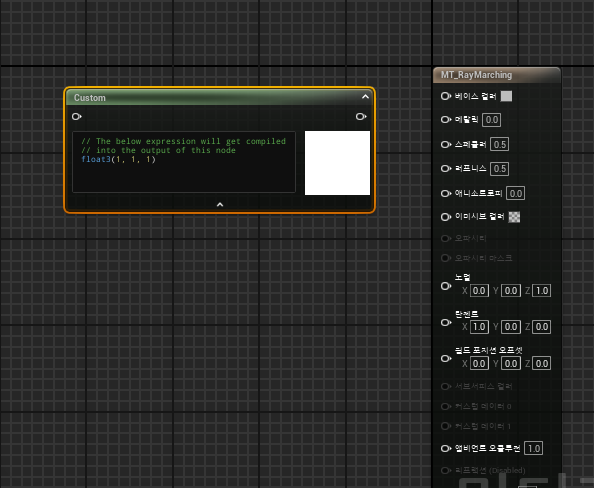
Custom Node를 하나 생성 한 뒤 아래의 코드를 넣고 다음과 같이 노드를 만들어준다.
cpp
float3 sphereCenter = objectPos; // 메시 중심 좌표
float3 rayOrigin = viewDir - worldPos;
float3 rayStep   = viewDir * 1;

for (int i = 0; i < 256; i++)
{
    // 바뀐 거리 계산
    float dist = length(rayOrigin + sphereCenter) - sphereRadius;

    if (dist < 0.01)
    {
        return float3(1, 0, 0); // Hit
    }

    OpacityMask = 1;
    rayOrigin += rayStep;
}

OpacityMask = 0;
return float3(0, 0, 0); // Miss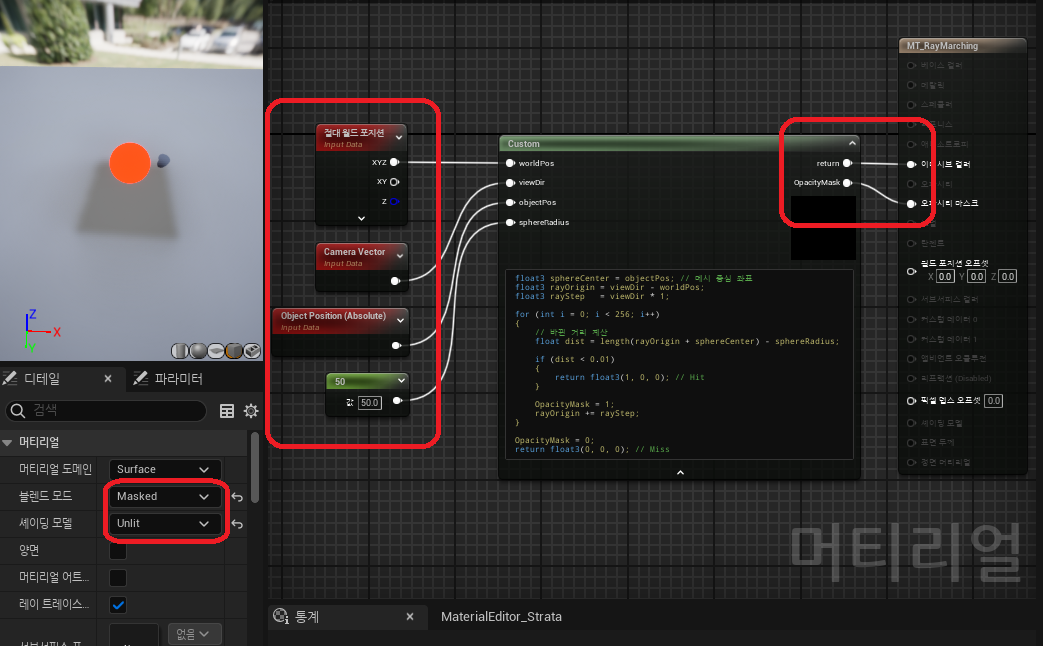
SDF를 구체형태로 잡았기 때문에 어떤 Mesh에 적용하던 구체 형태로 탐지가 될 것이다.
이후 여러 변형을 통해 Ray Marching으로 다양한 변형을 만들어낼 수 있다.