
1. Widget Pooling
게임에서 UI는 생각보다 비싼 오브젝트다. 특히 데미지 텍스트처럼 짧은 시간 동안 대량으로 생성/삭제되는 UI는 성능에 직접적인 영향을 준다.
예를 들어 몬스터 100마리를 동시에 공격한다고 가정해보자. 그 순간마다 CreateWidget이 호출되면 내부적으로 다음이 일어난다.
- UObject 생성 + GC 등록
생성할 때마다 메모리 할당 + GC 추적 리스트에 추가됨
- Slate UI 트리 생성 (핵심 병목)
UMG → 내부적으로 Slate Widget Tree 생성 Hierarchy (Text, Image 등)를 전부 새로 구성
- Layout / Paint 비용 증가
생성 직후는 반드시 전체 Layout 계산
- GC 스파이크
일정 시간 후 Widget들이 한꺼번에 GC됨 Destroy 시점이 아니라 GC 타이밍에 몰림
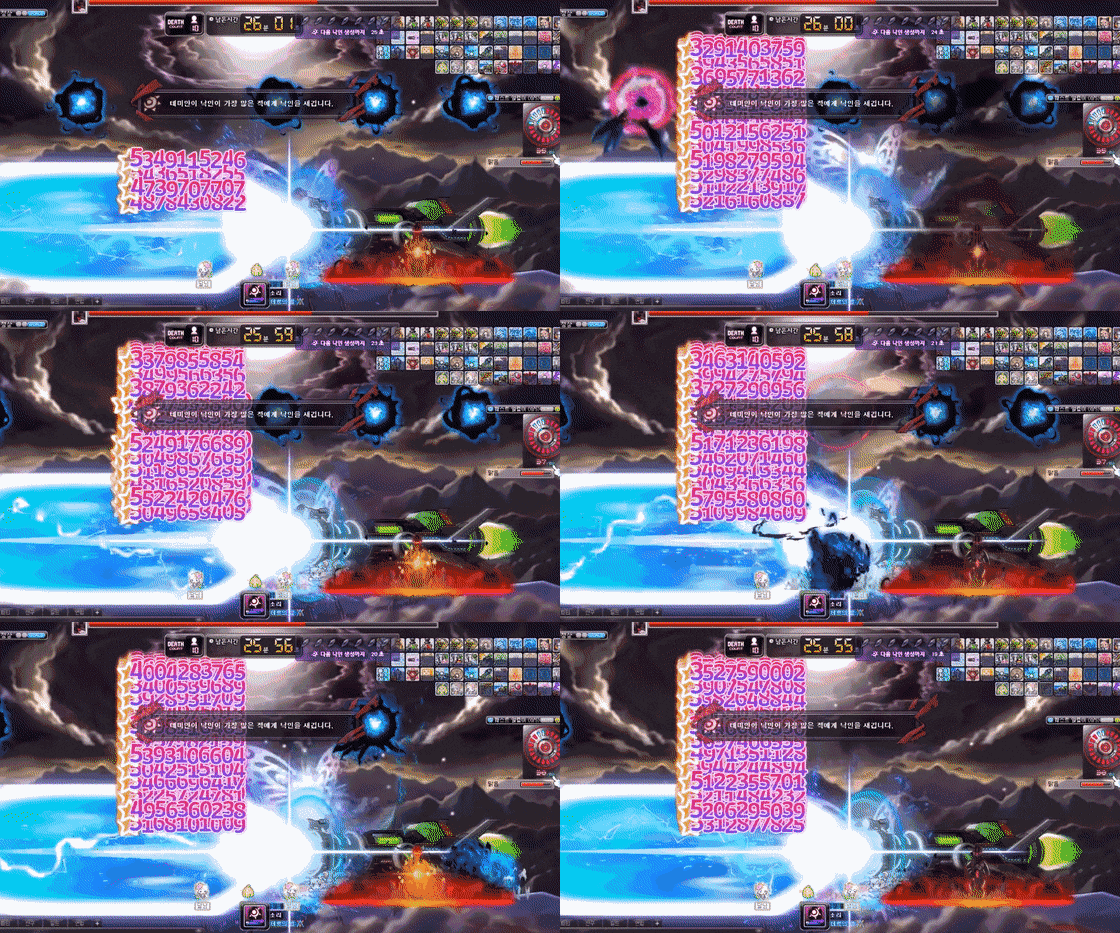
만약 위 사진처럼 데미지 UI를 넣어야할 때 CreateWidget → Destroy → GC 흐름을 반복하면 CPU 비용, 렌더링 비용, GC 비용이 모두 누적되어 성능 문제가 발생한다.
따라서 이런 문제를 해결하기 위해서는 위젯을 매번 생성/파괴하는 방식이 아니라, 이미 생성된 위젯을 재사용하는 Widget Pooling 구조가 필요하다.
2. Widget Pooling 구현
2-1. PoolableWidget
먼저 Pooling 기반으로 사용하기 위한 베이스 Widget 클래스를 정의한다.
#pragma once
#include "CoreMinimal.h"
#include "Blueprint/UserWidget.h"
#include "PoolableWidget.generated.h"

UCLASS()
class QTT_API UPoolableWidget : public UUserWidget
{
    GENERATED_BODY()

protected:
    // 기본적으로 틱을 차단
    virtual void NativeTick(const FGeometry& G, float D) override {}
};
UUserWidget은 기본적으로 화면에 표시되는 동안 매 프레임 Tick이 호출된다. 하지만 Pooling 구조에서는 이 Tick이 불필요한 비용이 된다.
따라서 NativeTick을 override하여 완전히 차단한다.
2-2. WorldIconWidget
WorldIconWidget은 실제로 풀링되는 UI 위젯 클래스다.
- 사용될 때는 Bind
- 반환될 때는 Unbind
되도록 하여 Create/Remove 대신 상태만 초기화해서 재사용하는 구조다.
WorldIconWidget.h
#pragma once
#include "CoreMinimal.h"
#include "PoolableWidget.h"
#include "WorldIconWidget.generated.h"

class UImage;
class UTextBlock;

// 풀링 대상이 되는 월드 아이콘 위젯
// UMG에서 이 클래스를 부모로 사용하는 Widget Blueprint를 만들어 사용
// 반드시 "IconImage", "LabelText" 이름의 위젯이 존재해야 함
UCLASS()
class QTT_API UWorldIconWidget : public UPoolableWidget
{
    GENERATED_BODY()

public:
    // 외부(Pool)에서 호출: 위젯에 데이터를 바인딩하고 표시
    void Bind(const FText& InLabel);

    // 외부(Pool)에서 호출: 위젯을 초기화하고 숨김
    void Unbind();

protected:
    // UMG에서 바인딩되는 이미지 (이름 동일해야 함)
    UPROPERTY(meta = (BindWidget))
    TObjectPtr<UImage> IconImage;

    // UMG에서 바인딩되는 텍스트 (이름 동일해야 함)
    UPROPERTY(meta = (BindWidget))
    TObjectPtr<UTextBlock> LabelText;

private:
    // 이전 텍스트 캐싱 (불필요한 SetText 호출 방지)
    FText CachedLabel;
};
WorldIconWidget.cpp
#include "WorldIconWidget.h"
#include "Components/Image.h"
#include "Components/TextBlock.h"

void UWorldIconWidget::Bind(const FText& InLabel)
{
    // 텍스트가 변경된 경우에만 업데이트
    // SetText는 내부적으로 Layout 재계산을 유발하므로 비용이 큼
    if (!CachedLabel.EqualTo(InLabel))
    {
        CachedLabel = InLabel;

        if (LabelText)
        {
            LabelText->SetText(InLabel);
        }
    }

    // 위젯을 화면에 보이도록 설정
    // HitTestInvisible: 입력은 막지 않지만, 클릭 판정에는 영향을 주지 않음
    SetVisibility(ESlateVisibility::HitTestInvisible);
}

void UWorldIconWidget::Unbind()
{
    // 캐싱된 텍스트 초기화
    CachedLabel = FText::GetEmpty();

    // 위젯을 숨김
    // Collapsed:
    // - 화면에 보이지 않음
    // - Layout / Paint 비용 없음
    // - 메모리에서는 유지 (Pooling 핵심)
    SetVisibility(ESlateVisibility::Collapsed);
}
2-3. WidgetPoolSubsystem
WidgetPoolSubsystem은 위젯의 생성 타이밍, 사용, 반환, 재사용까지 전체 Lifecycle을 통제하는 역할을 한다.
WidgetPoolSubsystem.h
#pragma once
#include "CoreMinimal.h"
#include "Subsystems/WorldSubsystem.h"
#include "WidgetPoolSubsystem.generated.h"

class UWorldIconWidget;
class UWorldIconComponent;

// 실제 Widget Pool을 담당하는 Subsystem

/*

- UWorldIconWidget을 미리 생성 (비싼 UObject + Slate 트리 생성 비용 선처리)
- 게임 중에는 배열에서 꺼내기만 함 (거의 0 비용)
- 반환 시에도 Destroy하지 않고 다시 Pool에 넣음 (GC 없음)

- UWorldIconWidget을 부모로 하는 모든 Widget Blueprint에서 사용 가능
- Widget Class별로 Pool이 자동으로 분리됨

- UWorldSubsystem:
  월드와 함께 생성/파괴됨 (전역 관리 용이)

- Warmup:
  Timer 기반으로 프레임에 나눠 생성 (Tick 사용 안함)

*/

UCLASS()
class QTT_API UWidgetPoolSubsystem : public UWorldSubsystem
{
    GENERATED_BODY()

public:
    virtual void Initialize(FSubsystemCollectionBase& C) override;
    virtual void Deinitialize() override;

    // 여러 프레임에 나눠서 위젯 미리 생성
    void WarmPool(TSubclassOf<UWorldIconWidget> WidgetClass,
        int32 Count, int32 PerFrame = 3);

    // Pool에서 위젯 하나 가져오기 (거의 0 비용)
    UWorldIconWidget* AcquireWidget(TSubclassOf<UWorldIconWidget> WidgetClass);

    // 위젯을 Pool로 반환 (Destroy 없음, GC 없음)
    void ReleaseWidget(UWorldIconWidget* W, TSubclassOf<UWorldIconWidget> WidgetClass);

    // WorldIconComponent에서 BeginPlay / EndPlay 시 호출
    void RegisterIcon(UWorldIconComponent* Comp);
    void UnregisterIcon(UWorldIconComponent* Comp);

    // 현재 Pool에 대기 중인 위젯 수
    int32 GetAvailableCount(TSubclassOf<UWorldIconWidget> WidgetClass) const;

    // 현재 사용 중인 위젯 수
    int32 GetActiveCount(TSubclassOf<UWorldIconWidget> WidgetClass) const;

private:
    // 실제 CreateWidget 호출 (비용이 큰 함수)
    UWorldIconWidget* CreateOneWidget(TSubclassOf<UWorldIconWidget> WidgetClass);

    // Warmup 처리 함수 (Timer에서 호출)
    void ProcessWarmup();

    // PlayerController 확보
    bool EnsurePC();

    // Widget Class별 Pool (미사용 상태)
    TMap<TSubclassOf<UWorldIconWidget>, TArray<TObjectPtr<UWorldIconWidget>>> Pool;

    // Widget Class별 Active 목록 (현재 사용 중)
    TMap<TSubclassOf<UWorldIconWidget>, TArray<TObjectPtr<UWorldIconWidget>>> Active;

    // CreateWidget에 필요한 PlayerController
    UPROPERTY()
    TObjectPtr<APlayerController> PC;

    // Warmup 요청 정보
    struct FWarmupRequest
    {
        TSubclassOf<UWorldIconWidget> WidgetClass;
        int32 Remaining;   // 남은 생성 개수
        int32 PerFrame;    // 프레임당 생성 개수
    };

    // Warmup 큐
    TArray<FWarmupRequest> WarmupQueue;

    // Warmup용 Timer
    FTimerHandle WarmupTimer;

    // 기본 설정값
    static constexpr int32 PER_FRAME = 3;
    static constexpr int32 DEFAULT_POOL_SIZE = 20;
};
WidgetPoolSubsystem.cpp
#include "WidgetPoolSubsystem.h"
#include "WorldIconWidget.h"
#include "WorldIconComponent.h"
#include "Components/WidgetComponent.h"
#include "GameFramework/PlayerController.h"

DECLARE_CYCLE_STAT(TEXT("WidgetPool"), STAT_WidgetPool, STATGROUP_UI)

void UWidgetPoolSubsystem::Initialize(FSubsystemCollectionBase& C)
{
    Super::Initialize(C);
}

void UWidgetPoolSubsystem::Deinitialize()
{
    // Warmup 타이머 정리
    if (WarmupTimer.IsValid())
        GetWorld()->GetTimerManager().ClearTimer(WarmupTimer);

    // 모든 데이터 초기화
    Pool.Empty();
    Active.Empty();
    WarmupQueue.Empty();
    PC = nullptr;

    Super::Deinitialize();
}

// PlayerController 확보
bool UWidgetPoolSubsystem::EnsurePC()
{
    if (PC) return true;

    PC = GetWorld()->GetFirstPlayerController();
    return PC != nullptr;
}

////////////////////////////////////////////////////////////////
// 등록: WorldIconComponent에서 호출

void UWidgetPoolSubsystem::RegisterIcon(UWorldIconComponent* Comp)
{
    if (!Comp || !Comp->WidgetClass || !Comp->WidgetComp) return;

    TSubclassOf<UWorldIconWidget> WClass = Comp->WidgetClass;

    // 해당 클래스 Pool이 없으면 Warmup 시작
    if (!Pool.Contains(WClass))
        WarmPool(WClass, DEFAULT_POOL_SIZE, PER_FRAME);

    // Widget 획득 (Pool 또는 생성)
    UWorldIconWidget* W = AcquireWidget(WClass);
    if (!W) return;

    // WidgetComponent에 연결
    Comp->WidgetComp->SetWidget(W);

    // 데이터 바인딩
    W->Bind(Comp->DisplayLabel);

    // 표시
    Comp->WidgetComp->SetVisibility(true);

    Comp->PooledWidget = W;
}

void UWidgetPoolSubsystem::UnregisterIcon(UWorldIconComponent* Comp)
{
    if (!Comp || !Comp->PooledWidget) return;

    // 상태 초기화
    Comp->PooledWidget->Unbind();

    // WidgetComponent에서 분리
    if (Comp->WidgetComp)
    {
        Comp->WidgetComp->SetVisibility(false);
        Comp->WidgetComp->SetWidget(nullptr);
    }

    // Pool로 반환 (Destroy 없음)
    ReleaseWidget(Comp->PooledWidget, Comp->WidgetClass);
    Comp->PooledWidget = nullptr;
}

////////////////////////////////////////////////////////////////
// Warmup: 프레임에 나눠 생성

void UWidgetPoolSubsystem::WarmPool(TSubclassOf<UWorldIconWidget> WidgetClass,
    int32 Count, int32 PerFrame)
{
    if (!WidgetClass) return;

    // 메모리 미리 확보
    Pool.FindOrAdd(WidgetClass).Reserve(Count);
    Active.FindOrAdd(WidgetClass).Reserve(Count);

    // Warmup 요청 추가
    WarmupQueue.Add({ WidgetClass, Count, PerFrame });

    // 타이머 시작
    if (!WarmupTimer.IsValid())
        GetWorld()->GetTimerManager().SetTimer(
            WarmupTimer, this,
            &UWidgetPoolSubsystem::ProcessWarmup, 0.f, true);
}

void UWidgetPoolSubsystem::ProcessWarmup()
{
    SCOPE_CYCLE_COUNTER(STAT_WidgetPool)

    // 더 이상 요청이 없으면 종료
    if (WarmupQueue.Num() == 0)
    {
        GetWorld()->GetTimerManager().ClearTimer(WarmupTimer);
        return;
    }

    FWarmupRequest& Req = WarmupQueue[0];

    // 이번 프레임에 생성할 개수
    int32 N = FMath::Min(Req.PerFrame, Req.Remaining);

    TArray<TObjectPtr<UWorldIconWidget>>& PoolArr =
        Pool.FindOrAdd(Req.WidgetClass);

    for (int32 i = 0; i < N; ++i)
    {
        UWorldIconWidget* W = CreateOneWidget(Req.WidgetClass);

        if (W)
        {
            // 초기 상태: 숨김
            W->Unbind();
            PoolArr.Add(W);
        }
    }

    Req.Remaining -= N;

    // 완료되면 큐에서 제거
    if (Req.Remaining <= 0)
        WarmupQueue.RemoveAt(0);

    // 모든 작업 완료 시 타이머 종료
    if (WarmupQueue.Num() == 0)
        GetWorld()->GetTimerManager().ClearTimer(WarmupTimer);
}

////////////////////////////////////////////////////////////////
// Pool 핵심 로직

UWorldIconWidget* UWidgetPoolSubsystem::AcquireWidget(TSubclassOf<UWorldIconWidget> WClass)
{
    TArray<TObjectPtr<UWorldIconWidget>>& PoolArr = Pool.FindOrAdd(WClass);

    UWorldIconWidget* W = nullptr;

    if (PoolArr.Num() > 0)
    {
        // Pool에서 꺼냄 (O(1))
        W = PoolArr.Pop(EAllowShrinking::No);
    }
    else
    {
        // Pool이 비어있으면 생성 (fallback)
        W = CreateOneWidget(WClass);
    }

    // Active 목록에 추가
    if (W)
        Active.FindOrAdd(WClass).Add(W);

    return W;
}

void UWidgetPoolSubsystem::ReleaseWidget(UWorldIconWidget* W,
    TSubclassOf<UWorldIconWidget> WClass)
{
    if (!W) return;

    // Active에서 제거
    TArray<TObjectPtr<UWorldIconWidget>>& ActiveArr =
        Active.FindOrAdd(WClass);

    int32 Idx = ActiveArr.IndexOfByKey(W);

    if (Idx != INDEX_NONE)
        ActiveArr.RemoveAtSwap(Idx);

    // Pool로 반환
    Pool.FindOrAdd(WClass).Add(W);
}

////////////////////////////////////////////////////////////////
// 실제 생성 (가장 비싼 함수)

UWorldIconWidget* UWidgetPoolSubsystem::CreateOneWidget(
    TSubclassOf<UWorldIconWidget> WClass)
{
    if (!EnsurePC() || !WClass) return nullptr;

    /*
    CreateWidget 비용:
    1. UObject 생성 (메모리 + GC 등록)
    2. Slate 트리 생성 (UMG → Slate 변환)
    → 매우 비쌈

    Pooling 구조에서는 이 비용을 Warmup에서만 발생시킴
    */

    return CreateWidget<UWorldIconWidget>(PC, WClass);
}

////////////////////////////////////////////////////////////////
// 상태 조회

int32 UWidgetPoolSubsystem::GetAvailableCount(
    TSubclassOf<UWorldIconWidget> WidgetClass) const
{
    const TArray<TObjectPtr<UWorldIconWidget>>* Found =
        Pool.Find(WidgetClass);

    return Found ? Found->Num() : 0;
}

int32 UWidgetPoolSubsystem::GetActiveCount(
    TSubclassOf<UWorldIconWidget> WidgetClass) const
{
    const TArray<TObjectPtr<UWorldIconWidget>>* Found =
        Active.Find(WidgetClass);

    return Found ? Found->Num() : 0;
}- Pool
생성이 완료된 Widget들을 보관하는 공간이다. 현재 사용되지 않는 위젯들이 들어 있으며, 필요할 때 즉시 꺼내 쓸 수 있는 상태를 유지한다.
- Active
현재 화면에 표시되고 있는, 즉 실제로 사용 중인 Widget들을 관리한다. 디버깅이나 상태 추적, 개수 확인 등에 활용된다.
- Warmup
가장 비용이 큰 CreateWidget 호출을 게임 시작 시점에 미리 수행하는 단계다. 한 프레임에 몰아서 생성하지 않고, 여러 프레임에 나눠 생성함으로써 프레임 드랍을 방지한다.
- Acquire
Widget이 필요할 때 Pool에서 하나를 꺼내오는 과정이다. 이미 생성된 객체를 단순히 가져오기만 하기 때문에, 거의 비용 없이(O(1)) 즉시 사용 가능하다.
- Release
사용이 끝난 Widget을 다시 Pool로 되돌리는 과정이다. 이때 Widget을 파괴하지 않고 상태만 초기화한 뒤 재사용하기 때문에, GC나 추가 비용이 발생하지 않는다.
2-5. WidgetIconComponent
WorldIconComponent는 Actor와 Widget Pool을 연결해주는 브릿지 역할을 한다.
WidgetIconComponent.h
#pragma once
#include "CoreMinimal.h"
#include "Components/ActorComponent.h"
#include "WorldIconComponent.generated.h"

class UWorldIconWidget;
class UWidgetComponent;

// Actor에 부착해서 사용하는 컴포넌트
// Actor가 파괴되면 Widget은 Pool로 반환됨
UCLASS(ClassGroup=(UI), meta=(BlueprintSpawnableComponent))
class QTT_API UWorldIconComponent : public UActorComponent
{
    GENERATED_BODY()

public:
    // 사용할 Widget 클래스 (반드시 WorldIconWidget 기반)
    UPROPERTY(EditAnywhere, BlueprintReadWrite, Category = "World Icon")
    TSubclassOf<UWorldIconWidget> WidgetClass;

    // 아이콘에 표시할 텍스트
    UPROPERTY(EditAnywhere, BlueprintReadWrite, Category = "World Icon")
    FText DisplayLabel = FText::FromString(TEXT("Target"));

    // Actor 기준으로 위에 띄울 높이
    UPROPERTY(EditAnywhere, BlueprintReadWrite, Category = "World Icon")
    float HeightOffset = 120.f;

    // 외부에서 아이콘 표시/숨김 제어
    UFUNCTION(BlueprintCallable, Category = "World Icon")
    void SetIconVisible(bool bVisible);

    // Pool 시스템에서 관리 (직접 건드리지 말 것)
    UPROPERTY()
    TObjectPtr<UWidgetComponent> WidgetComp;

    UPROPERTY()
    TObjectPtr<UWorldIconWidget> PooledWidget;

protected:
    virtual void BeginPlay() override;
    virtual void EndPlay(const EEndPlayReason::Type R) override;
};
WidgetIconComponent.cpp
#include "WorldIconComponent.h"
#include "WorldIconWidget.h"
#include "WidgetPoolSubsystem.h"
#include "Components/WidgetComponent.h"

void UWorldIconComponent::BeginPlay()
{
    Super::BeginPlay();

    AActor* Owner = GetOwner();
    if (!Owner || !WidgetClass) return;

    // 3D 공간에 UI를 표시하기 위한 WidgetComponent 생성
    WidgetComp = NewObject<UWidgetComponent>(Owner);
    WidgetComp->RegisterComponent();

    // Actor Root에 부착
    WidgetComp->AttachToComponent(
        Owner->GetRootComponent(),
        FAttachmentTransformRules::KeepRelativeTransform);

    // 위치 설정 (머리 위 등)
    WidgetComp->SetRelativeLocation(FVector(0, 0, HeightOffset));

    // Screen Space로 표시
    WidgetComp->SetWidgetSpace(EWidgetSpace::Screen);

    // 위젯 크기 자동 조정
    WidgetComp->SetDrawAtDesiredSize(true);

    // 처음에는 숨김
    WidgetComp->SetVisibility(false);

    double Start = FPlatformTime::Seconds();

    // Pool에서 Widget 가져오기
    if (UWidgetPoolSubsystem* Pool =
        GetWorld()->GetSubsystem<UWidgetPoolSubsystem>())
    {
        // Widget을 Pool에서 가져와서 WidgetComponent에 연결
        Pool->RegisterIcon(this);

        double Ms = (FPlatformTime::Seconds() - Start) * 1000.0;

        UE_LOG(LogTemp, Warning,
            TEXT("=== ICON ACQUIRE: [%s] in %.2f ms | idle: %d active: %d ==="),
            *Owner->GetName(), Ms,
            Pool->GetAvailableCount(WidgetClass),
            Pool->GetActiveCount(WidgetClass));
    }
    else
    {
        // Subsystem이 없는 경우 (비정상 상황)
        UE_LOG(LogTemp, Error,
            TEXT("=== ICON ACQUIRE FAILED — no pool subsystem! Actor: [%s] ==="),
            *Owner->GetName());
    }
}

// 외부에서 아이콘 표시/숨김
void UWorldIconComponent::SetIconVisible(bool bVisible)
{
    if (WidgetComp)
        WidgetComp->SetVisibility(bVisible);
}

void UWorldIconComponent::EndPlay(const EEndPlayReason::Type R)
{
    double Start = FPlatformTime::Seconds();

    // Pool로 반환
    if (UWidgetPoolSubsystem* Pool =
        GetWorld()->GetSubsystem<UWidgetPoolSubsystem>())
    {
        // Widget을 초기화하고 Pool로 되돌림 (Destroy 아님)
        Pool->UnregisterIcon(this);

        double Ms = (FPlatformTime::Seconds() - Start) * 1000.0;

        UE_LOG(LogTemp, Warning,
            TEXT("=== ICON RELEASE: [%s] in %.2f ms | idle: %d active: %d ==="),
            *GetOwner()->GetName(), Ms,
            Pool->GetAvailableCount(WidgetClass),
            Pool->GetActiveCount(WidgetClass));
    }

    // WidgetComponent는 Actor 소유이므로 반드시 직접 제거
    if (WidgetComp)
    {
        WidgetComp->SetWidget(nullptr);
        WidgetComp->DestroyComponent();
        WidgetComp = nullptr;
    }

    Super::EndPlay(R);
}
3. 테스트 결과
총 100개의 Widget을 대상으로 Pooling 방식과 Create/Remove 방식의 성능을 비교하였다.
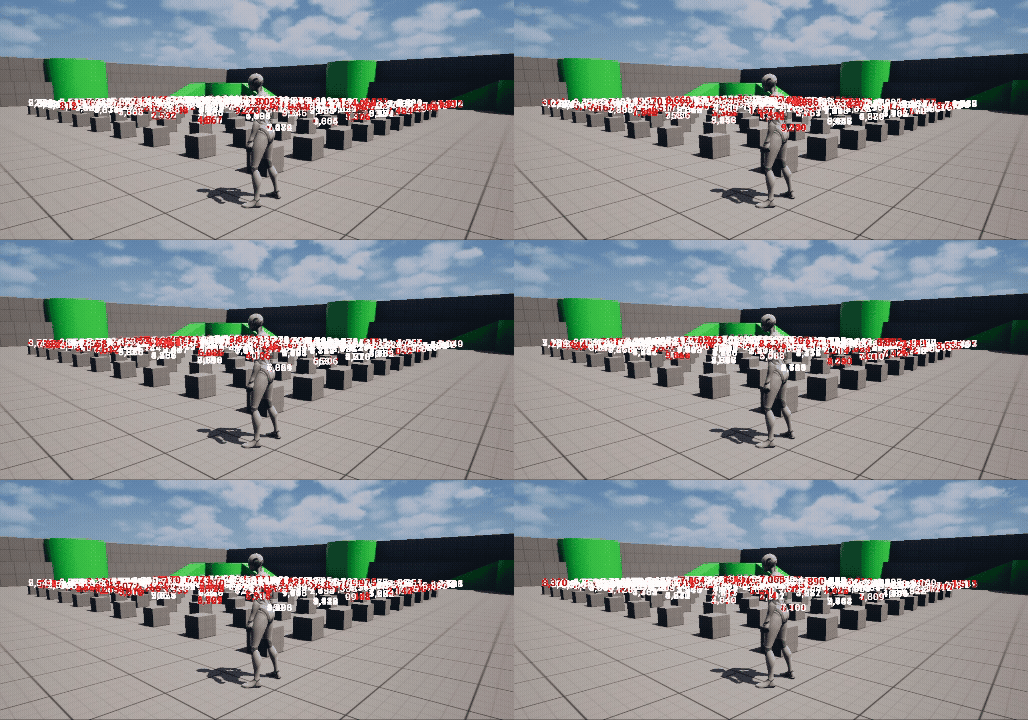
3-1. Pooling 방식
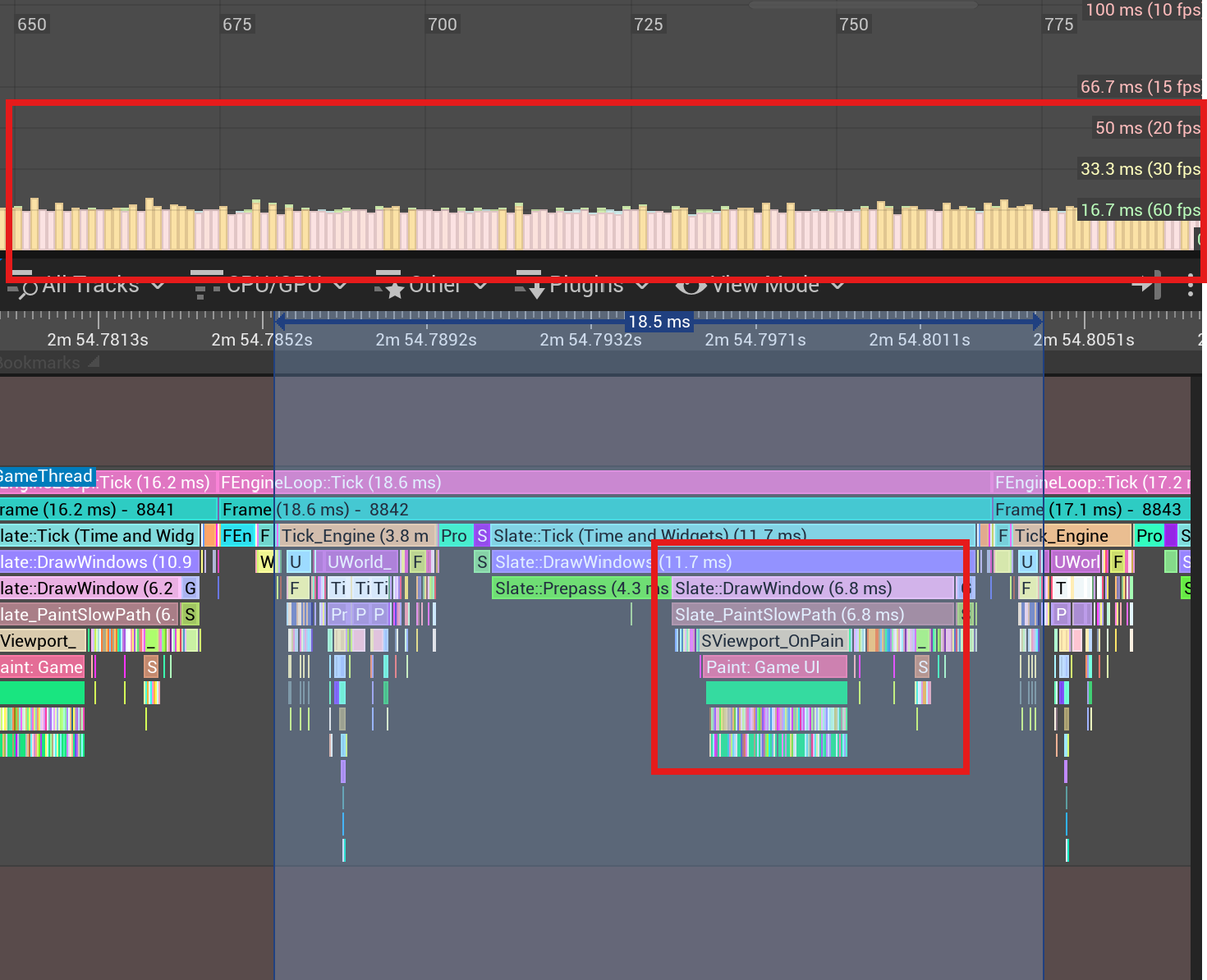
Pooling 방식은 초기 생성 이후 위젯을 재사용하기 때문에, 런타임 중 추가적인 객체 생성 비용이 발생하지 않는다.
그 결과, 전체 테스트 구간에서 프레임이 안정적으로 유지되며, 눈에 띄는 프레임 드랍이나 스파이크 현상이 발생하지 않는 것을 볼 수 있다. 또한 Widget 생성이 초기 한 번으로 제한되기 때문에 CPU 사용량 역시 일정하게 유지되는 것을 확인할 수 있었다.
3-2. Create/Remove 방식
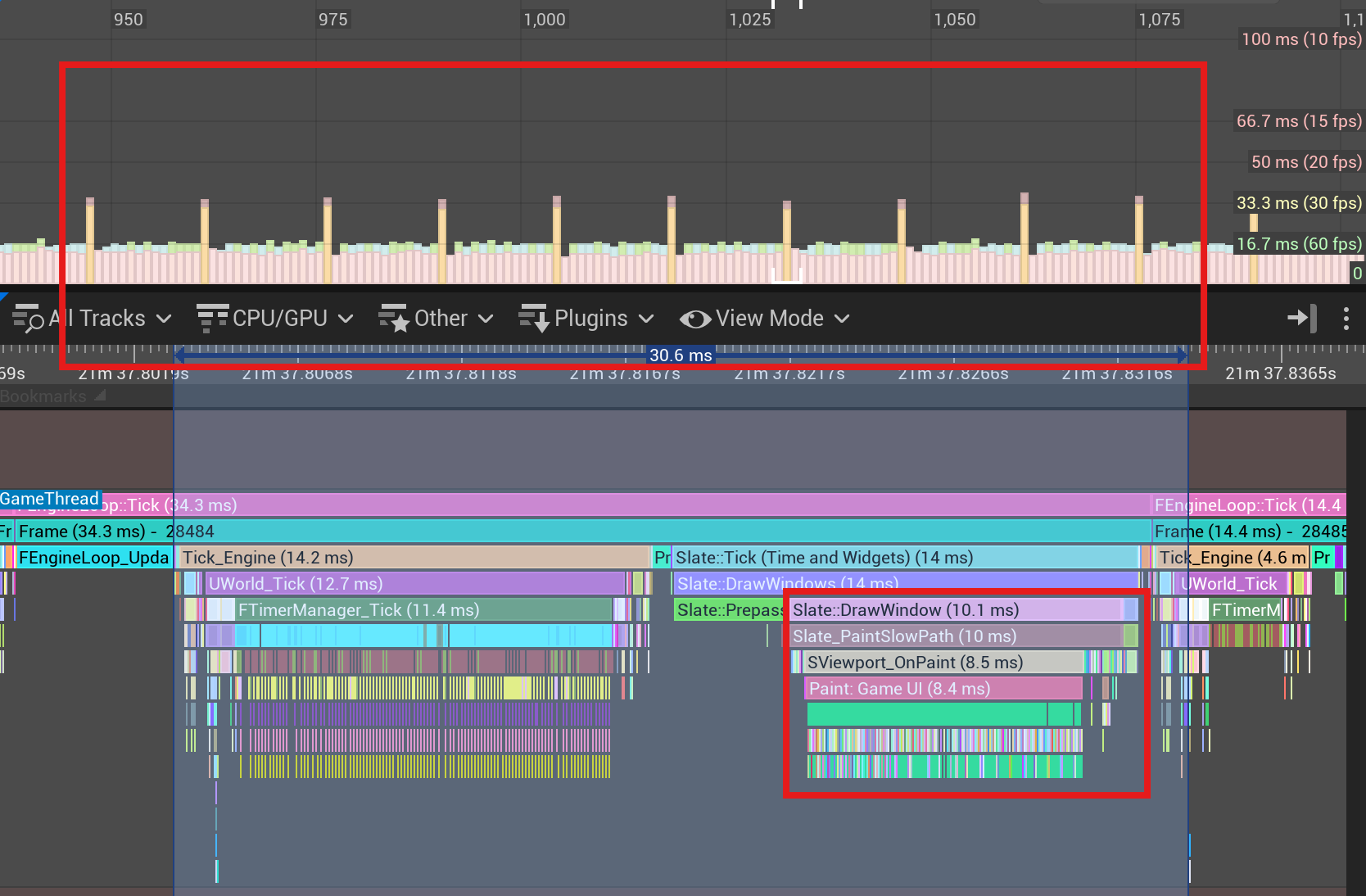
Create/Remove 방식은 위젯을 사용할 때마다 새로 생성하고, 일정 시간 이후 제거하는 구조이다.
이로 인해 다음과 같은 문제가 발생하였다.
- 지속적인 CreateWidget 호출로 인한 객체 생성 비용 증가
- RemoveFromParent 이후 Garbage Collection 대상 객체 누적
- GC 수행 시점에서 프레임 스파이크 발생
실제로 측정 결과, 특정 주기로 프레임이 튀는 현상이 관찰되었으며, 평균 처리 시간 또한 6.8ms → 10.1ms로 증가하였다. 이는 약 48.5%의 성능 저하에 해당한다.
참고 자료